Build a SaaS Product Without Code: Customer Two Breaks It
Orkosi Team · · 11 min read

The demo works. The second customer is the test.
Almost every attempt to build a SaaS product without code works perfectly for customer one, because customer one is really just the founder with a login. The data belongs to one company, the permissions question never comes up, and "billing" is a payment link that someone clicked once. Then customer two signs up, and you discover that you built an app, not a SaaS.
The gap between an app and a SaaS product is multi-tenancy, not features. You can ship a gorgeous dashboard, a slick onboarding flow and an AI-powered whatever, and still have nothing sellable, because the architecture assumes a single customer. The five things that break are: signup (accounts versus users), roles and permissions, tenant data isolation, subscription billing state, and support access. This article covers each one, the symptom, and the minimum correct implementation.

What 'multi-tenant' actually means (and why it is a data-model decision)
A tenant is a customer account, which may contain many users. Multi-tenancy is one running system serving many tenants whose data and configuration are isolated from each other. The distinction matters because people conflate "users" with "customers": an accounting SaaS with 40 customer firms and 300 accountants has 40 tenants and 300 users, and almost every rule in the system is written against the tenant, not the user.
Multi-tenant SaaS architecture is a data-model decision, not a feature you enable later. AWS frames tenant isolation as a first-class architectural concern precisely because it cuts across storage, identity, compute and operations.
Pooled vs siloed tenants
Pooled means all tenants share the same tables, distinguished by a tenant_id column. Siloed means each tenant gets a separate database, schema or even stack.
| Pooled (shared tables + tenant key) | Siloed (database or schema per tenant) | |
|---|---|---|
| Cost per tenant | Low, one set of infrastructure | High, scales linearly with customers |
| Blast radius of a bug | Severe: one missing filter leaks everyone | Contained to one customer |
| Onboarding speed | Instant, insert a row | Requires provisioning |
| Noisy-neighbour risk | Real, needs quotas and indexes | Low |
| Compliance story | Needs explanation and controls | Easy to explain to enterprise buyers |
| Schema migrations | One migration | N migrations, versions drift |
For most early SaaS products, pooled is the right default: cheaper, faster to onboard, simpler to migrate. Siloed makes sense when a single enterprise customer demands it, when regulatory requirements are specific, or when one tenant's volume dwarfs everyone else's. Hybrid is common too: pooled by default, siloed for the top tier.
Why tenant isolation isn't a toggle
Isolation is the sum of every query, every API route, every background job and every file path in your system respecting the same boundary. One forgotten WHERE tenant_id = ? in a report query is a data breach, and it will be in the one query you wrote at 2am that nobody reviewed.
The decision gets made on day one whether or not you make it. If you build without a tenants table, you have chosen single-tenancy by default, and retrofitting means touching every table, every query and every piece of historical data.
The five things customer two breaks
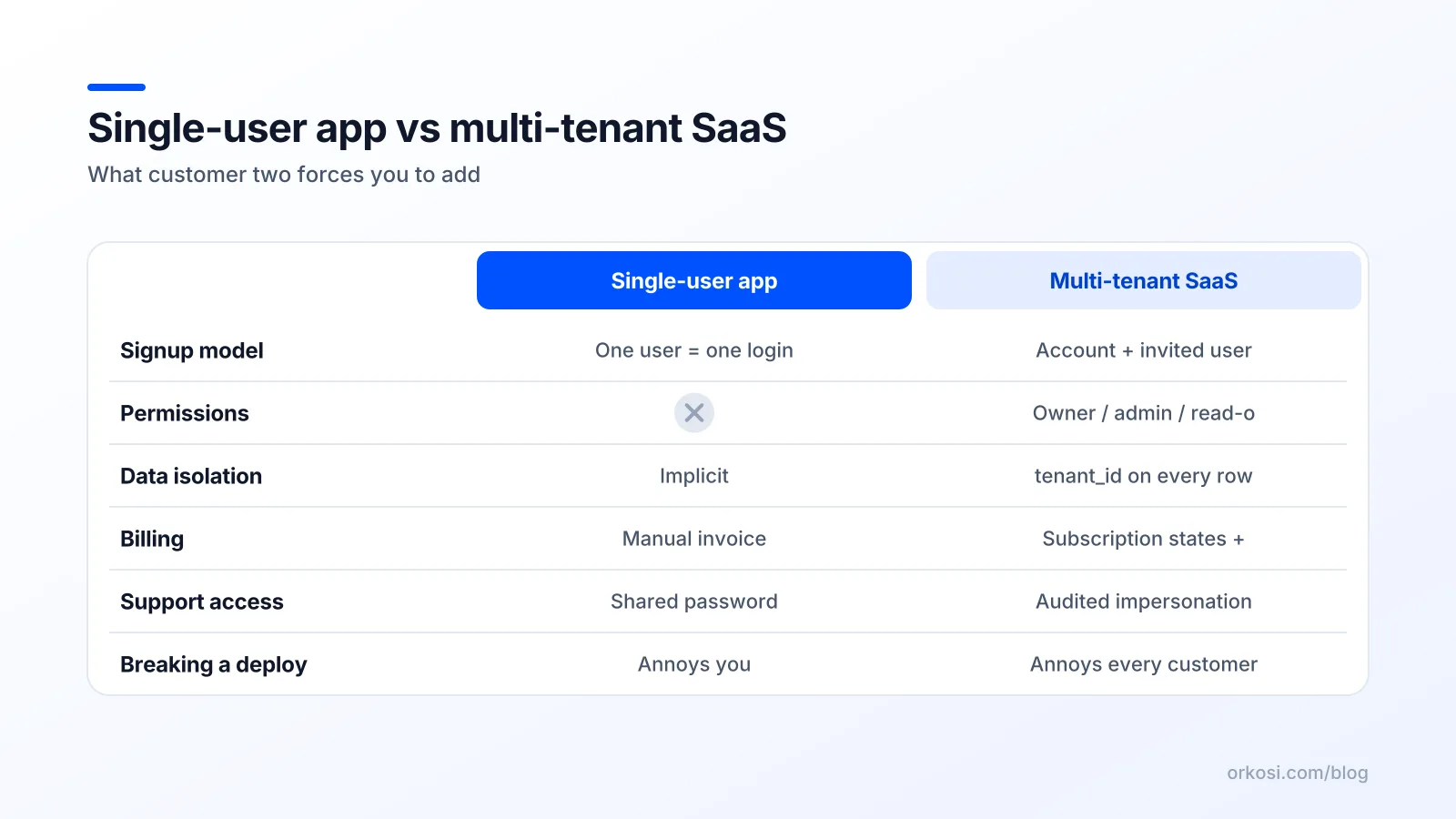
Signup and invites: accounts, not users
Symptom: your support inbox fills with "can you add my colleague?" and you are manually creating logins, hoping you attached them to the right company. Worse, two people from the same company sign up separately and end up with two disconnected workspaces containing half the data each.
Minimum correct implementation: signup creates an organisation and makes the signer-up its owner. The owner invites others by email, invitations carry a role, and accepting one joins an existing tenant rather than creating a new one. A user who belongs to two tenants (consultants, agencies) needs a tenant switcher. The AWS Well-Architected SaaS Lens treats frictionless, automated onboarding as a core requirement rather than an operational nicety, and it is right: manual onboarding caps your growth at your own working hours.
Roles: the owner, the admin, the read-only accountant
Symptom: everyone in the tenant can do everything, including delete the workspace and change the billing card. Your first mid-sized customer asks "can my bookkeeper see invoices but not client records?" and the answer is no.
SaaS roles do not need to be elaborate at the start. Three cover most products: owner (billing and destructive actions), admin (manage data and members), member (use the product). Add read-only when someone asks. The important part is that permission checks live on the server, enforced per request, not hidden by conditionally rendering a button. Hiding the delete button is UI; blocking the DELETE endpoint is security.
Data isolation: every query needs a tenant filter
Symptom: a customer sees a record that is not theirs. Sometimes it is a listing page that forgot a filter. More often it is an object fetched by ID: /api/invoices/8814 returns invoice 8814 because the code checked that you are logged in, not that invoice 8814 belongs to your tenant.

This is not hypothetical. Broken access control is ranked A01 in the OWASP Top 10, the most common serious weakness class in web applications, and reading another account's records by changing an identifier is the most boring, most frequent version of it.
Minimum correct implementation: the tenant comes from the authenticated session, never from a request parameter. Every read and write is scoped by it. Every object lookup verifies ownership before returning. And ideally the database refuses to serve cross-tenant rows even if the application forgets, which is the next section.
Billing: subscriptions, seats, dunning, cancellation
Symptom: payments arrive in Stripe and nothing in your app knows about them. Access is granted manually. Customers who cancel keep using the product. Failed cards silently keep the lights on for months, or cut access with no warning email.
Minimum correct implementation: a subscription record per tenant with a status, a plan, a seat count and a current period end, kept in sync by webhooks. Feature access reads that record, not a boolean you ticked by hand.
Support: how you look at a customer's account without logging in as them
Symptom: a customer reports a bug, and your only debugging method is asking for their password or screen-sharing. This is both a security problem and a speed problem.
Minimum correct implementation: an internal admin view that lists tenants and lets staff inspect a tenant's data read-only, plus a deliberate, logged "impersonate" action for the cases that need it. Every impersonation session should record who, which tenant and when. Tenant-aware operational tooling is a product requirement, and it is the single thing that most founders building a SaaS product without code never build at all.
Why no-code platforms hit this wall sooner than people expect
Visual builders are genuinely excellent at screens and workflows. Drag out a table view, bind it to a data source, add a form, wire a notification. For that work they are faster than writing code.
They are weaker at the three things customer two requires, because those live in data and middleware rather than the UI. Per-tenant authorisation is a rule applied to every request. Row-level enforcement is a database property. Subscription state is a state machine fed by webhooks. None of these are screens.
To be fair, mature no-code platforms do have roles and privacy rules, and configured correctly they work. The honest problems are three:
- They are opt-in. The default on a new table is usually "visible", and you must remember to restrict it. Tenant isolation should fail closed, not open.
- They are easy to get subtly wrong. A rule applied to a table but not to a view, an API endpoint exposed without the same filter, a public form that writes without a tenant key.
- They are hard to test. You cannot easily write an automated test asserting "user in tenant A cannot read tenant B's invoices" and run it on every change. You click around and hope.
These limitations bite earlier than people expect, typically somewhere between customer two and customer twenty.
Generated code sits differently. The rules are explicit lines you can read, a reviewer can audit and a test suite can assert. That is the trade-off that makes AI-built code attractive for SaaS specifically: build speed closer to no-code, with authorisation logic you own as text rather than configuration inside someone else's platform. The cost is that you now have a codebase to maintain. On Orkosi the agents write and deploy that code to your AWS footprint and keep iterating through tasks, so the rules are inspectable — but it is still code, and you should still read the parts that matter. See what gets built for real examples, and how Orkosi compares with other builders for where visual tools remain the better choice.
What I'd build before taking a second payment
A tenant table and a hard rule
One organisations (or tenants) table. Every business table gets a tenant_id foreign key, no exceptions, including logs, uploads and audit records. The hard rule: no business table ships without it, and the tenant always comes from the session.
If you are still shaping your schema, read the data-model guidance in the Orkosi docs before you add tables rather than after.
Database-enforced isolation
Application code forgets. Databases do not. In Postgres, row security policies let you declare that a table's rows are only visible when tenant_id matches a session variable set at the start of each request. A forgotten WHERE clause then returns zero rows instead of someone else's data.
This is the highest-leverage hour of work in a multi-tenant SaaS architecture. It converts an entire class of silent, catastrophic bugs into an obvious empty result you notice in development.
An entitlement check in front of every paid feature
Write one server-side function: tenantCan(tenantId, 'feature'). It reads the subscription status, plan and limits, and returns true or false. Every paid feature calls it. Do not scatter plan comparisons across twelve files, because you will add a plan and miss four of them.
When you are directing AI agents, say this explicitly in the task: "pooled multi-tenant, tenant_id on every table, Postgres row-level security keyed to the session tenant, three roles, a single entitlement function, subscription status from Stripe webhooks." Agents build what you specify. Vague prompts produce the single-tenant demo, and that is a specification failure, not a model failure.
Billing is a product surface, not a settings page
SaaS subscription billing is business logic, not a payment button. A subscription moves through states, and your app should behave differently in each one.
| Status | In-app behaviour |
|---|---|
trialing |
Full access, visible days remaining, prompt to add a card |
active |
Full access for the plan's features and seat count |
past_due |
Access with a prominent banner while retries run |
unpaid / canceled |
Read-only or locked, data retained for a defined window |
incomplete |
No access until the first payment succeeds |
Stripe's subscription lifecycle documentation is the reference: the statuses, the webhook events that signal transitions, and the retry schedule for failed payments. Three rules follow.
Webhooks are the source of truth. Do not grant access on the checkout redirect, because users close tabs and payments can fail asynchronously. Grant it when customer.subscription.updated says so, and make your handler idempotent because events can arrive more than once.
Dunning is a feature. Cards expire constantly. A failed payment should trigger retries, an email with a card-update link, and graceful in-app degradation. Silent cutoff turns a recoverable billing hiccup into churn.
Seats need proration. When a customer invites a fifth user on a per-seat plan, the subscription quantity changes mid-cycle. Decide how you handle the difference and tell the customer before they see the invoice.
The failure mode in no-code builds is treating "they paid once" as "they have access forever", because the payment was a one-off link and nothing listens for what happens next. Orkosi includes billing tooling in the platform, and the credit model that funds agent work is set out on the pricing page rather than here, because your customers' billing and your own are separate questions.
The customer-two readiness checklist
Run this in an afternoon before you invoice anyone else.
- There is a tenants/organisations table, and every business table has
tenant_id. - The tenant identity comes from the session, never from a URL, body or header a user controls.
- Row-level security (or an equivalent database-level guard) is enabled on tenant tables.
- Signup creates an organisation; invitations join an existing one.
- At least three roles exist, enforced server-side on every mutating endpoint.
- One entitlement function gates every paid feature.
- Subscription status is updated by webhooks and is idempotent.
- Failed payments trigger retries, an email and in-app degradation.
- Staff can view a tenant read-only, and impersonation is logged.
- Background jobs, exports, file uploads and search are tenant-scoped too.
The manual test that matters. Create two accounts, A and B, in separate browsers, with real, distinguishable data in both. Now, as A, try to reach B's records: change record IDs in URLs, call the API with A's token and B's object IDs, submit forms with B's identifiers, request an export and a shared file path. Every attempt should return 404 or 403, never data. If you cannot break it in thirty minutes of trying, you are ahead of most funded startups.
FAQ
Can you really build a multi-tenant SaaS product without code?
Yes, if "without code" means you do not write it yourself rather than there being no code. Visual no-code builders can get you to a working multi-tenant product, but you must configure isolation, roles and billing state carefully and you cannot easily test them. AI agent platforms like Orkosi generate real code you own and deploy it, which makes those rules explicit and reviewable, at the cost of having a codebase to maintain.
Should each customer get their own database?
Usually not at the start. Pooled tenancy with a tenant_id and database-enforced row security is cheaper, onboards instantly and avoids schema drift across dozens of databases. Move specific customers to siloed storage when an enterprise contract, a regulator or an outsized workload actually requires it.
How do I test tenant isolation without a security engineer?
Create two accounts with real data and try to reach account B from account A by changing identifiers in URLs and API calls. Then turn that into an automated test that runs on every deployment, asserting that cross-tenant requests return 403 or 404. This covers the most common case of broken access control and takes an hour, not a security audit.
When is it too late to retrofit multi-tenancy?
It is never impossible, but it gets expensive fast. Retrofitting at five customers means a schema migration and a careful backfill; at five hundred it means a migration, a backfill, a dual-write period and an audit of every query, job and integration. The cheap moment is before customer two, which is exactly when nobody feels like doing it.
Build the tenant boundary first and the rest of the product on top of it: start free and specify pooled multi-tenancy, row-level security and webhook-driven entitlements in your first task. Check pricing to see how credits map to the iteration work that follows.